TEXT Commands
{command} {font} {size} {x} {y} {data}
{font}: Name/number of the font.
{size}: Size identifier for the font.
{x}: Horizontal starting position.
{y}: Vertical starting position.
{data}: The text to be printed.
Ejemplo:
! 0 200 200 210 1
TEXT 4 0 200 100 TEXT
TEXT90 4 0 200 100 T90
TEXT180 4 0 200 100 T180
TEXT270 4 0 200 100 T270
FORM
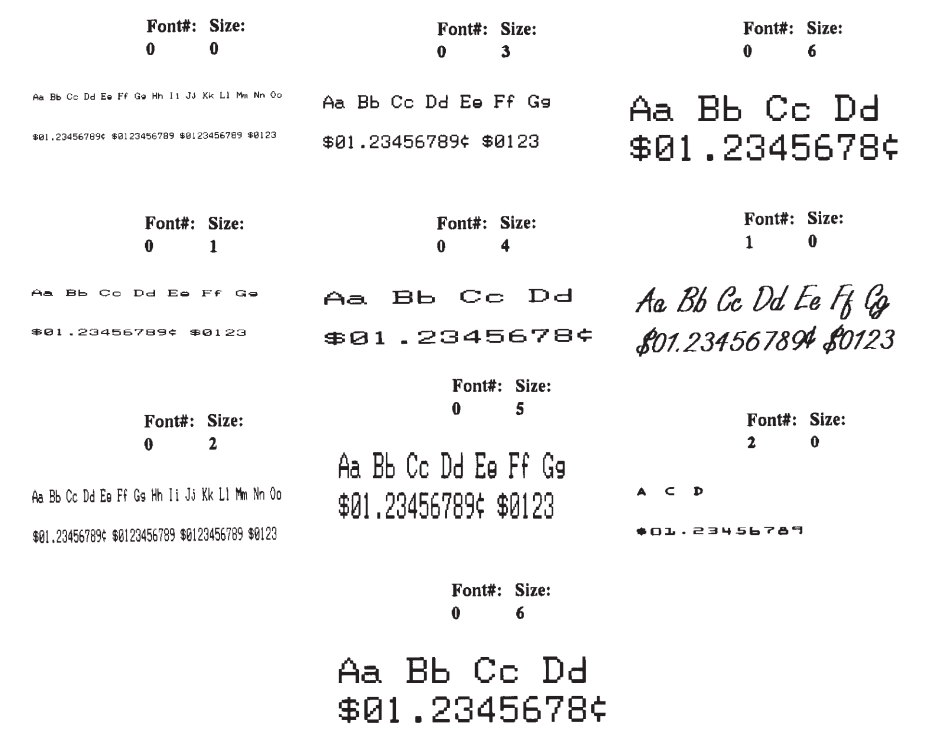
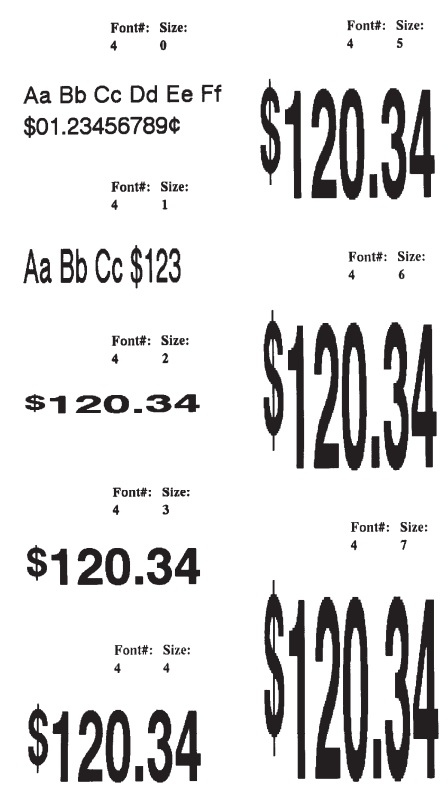

TEXT Concatenation Commands (CONCAT and VCONCAT)
{command} {x} {y} {font} {size} {offset} {data} ,, ,,, ,, {font} {size} {offset} {data} <ENDCONCAT>
where:
{command}: Choose from the following
CONCAT: Horizontal concatenation.
VCONCAT: Vertical concatenation.
{x}: Horizontal starting position.
{y}: Vertical starting position.
{font}: Name/number of the font.
{size}: Size identifier for the font.
{offset}: Unit-value to offset text from the starting position.
{data}: Text to be printed.
<ENDCONCAT>: Terminates concatenation.
Ejemplo:
! 0 200 200 210 1
CONCAT 75 75
4 2 5 $
4 3 0 12
4 2 5 34
ENDCONCAT
FORM
MULTILINE (ML) Commands
MULTILINE (ML) allows you to print multiple lines of text using the same font and line-height.
Format:
{command} {height}
{text} {font} {size} {x} {y}
{data}
“
{data}
<ENDMULTILINE>
where:
•{command}: MULTILINE (or ML) - Prints multiple lines of text.
•{height}: Unit-height for each line of text.
•{text}: Text command (TEXT, VTEXT, etc.).
•{font}: Name/number of the font.
•{size}: Size identifier for the font.
•{x}: Horizontal starting position.
•{y}: Vertical starting position.
•{data}: Text to be printed.
•<ENDMULTILINE> (or ENDML): Terminates MULTILINE.
Ejemplo:
! 0 200 200 210 1
ML 47
TEXT 4 0 10 20
1st line of text
2nd line of text
:
Nth line of text
ENDML
FORM
SCALABLE TEXT
Scalable text allows a user to print text at any point size. Point size can be specified for both the X and Y directions to produce characters that are “stretched” in either their width or height. Point sizes specified and text produced will print at 72 points equating to one inch (25.4mm).
The printer can contain scalable font files as part of the application, or scalable font files can be downloaded to the printer using one of the utilities on the supplied disk. A scalable text file must be present in your printer’s memory in order to use scalable text features.
SCALE-TEXT Commands
The SCALE-TEXT commands allow the user to specify the point size of both the width and height of the font.
Format:
{command} {name} {width} {height} {x} {y} {data}
where:
{command}: SCALE-TEXT (or ST): Prints scaled text horizontally.
VSCALE-TEXT (or VST): Prints scaled text vertically.
{name}: Font name.
{width}: Font width (point size).
{height}: Font height (point size).
{x}: Horizontal starting position.
{y}: Vertical starting position.
{data}: Text to be printed.
Ejemplo:
! 0 200 200 300 1
CENTER
; Print using x and y scales of 10 points
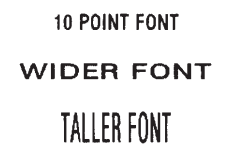
SCALE-TEXT PLL_LAT.CSF 10 10 0 10 POINT FONT
; Print using x scale of 20 points and y scale of 10 points
SCALE-TEXT PLL_LAT.CSF 20 10 0 80 WIDER FONT
; Print using x scale of 10 points and y scale of 20 points
SCALE-TEXT PLL_LAT.CSF 10 20 0 150 TALLER FONT
FORM
SCALABLE CONCATENATION Commands
Scalable concatenation allows you to assign different character styles to strings, printing them with uniform spacing on the same text line. Both scalable and bitmap text can be combined between a CONCAT/ENCONCAT command. See also Text Concatenation Commands.
Format:
{command} {x} {y}
<ST> {name} {width} {height} {offset} {data}
“ “ “ “ “
<ST> {name} {width} {height} {offset} {data}
<ENDCONCAT>
where:
{command}: Choose from the following:
CONCAT: Horizontal concatenation.
VCONCAT: Vertical concatenation.
{x}: Horizontal starting position.
{y}: Vertical starting position.
{name}: Font name.
{width}: Font width point size.
{height}: Font height point size.
{offset}: Unit-value to offset text from the starting position. Used to align individual text strings or create superscript/subscript characters.
{data}: Text to be printed.
<ENDCONCAT>: Terminates concatenation.
Ejemplo:
! 0 200 200 210 1
CENTER
; Concatenate 3 scalable font strings and 1
; Resident font string
CONCAT 0 20
4 1 0 2/
ST PLL_LAT.CSF 20 20 15 $
ST PLL_LAT.CSF 40 40 0 22
ST PLL_LAT.CSF 20 20 0 99
ENDCONCAT
FORM
BARCODE Command
The BARCODE command prints bar codes in both vertical and horizontal orientations at specified widths and heights.
Standard Bar Codes
Format:
{command} {type} {width} {ratio} {height} {x} {y} {data}
where:
{command}: Choose from the following:
BARCODE (or B): Prints bar code horizontally.
VBARCODE (or VB): Prints bar code vertically.
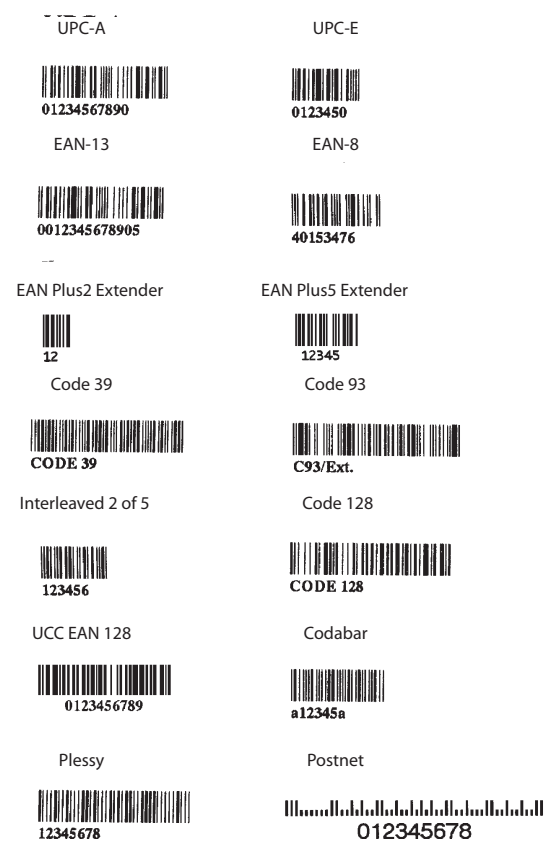
{type}: Choose from the following table:
Symbology Use
UPC-A UPCA, UPCA2, UPCA5
UPC-E UPCE, UPCE2, UPCE5
EAN/JAN-13 EAN13, EAN132, EAN135
EAN/JAN-8 EAN8, EAN82, EAN 85
Code 39 39, 39C, F39, F39C
Code 93/Ext. 93 93
Interleaved 2 of 5 I2OF5
Interleaved 2 of 5 with checksum I2OF5C
German Post Code I2OF5G
Code 128 (Auto) 128
UCC EAN 128 UCCEAN128
Codabar CODABAR, CODABAR16
MSI/Plessy MSI, MSI10, MSI1010, MSI1110
Postnet POSTNET
FIM FIM
{width}: Unit-width of the narrow bar.
{ratio}: Ratio of the wide bar to the narrow bar. Refer to the table below for appropriate settings.
{height}: Bar code height.
{x}: Horizontal starting position.
{y}: Vertical starting position.
{data}: Data to be encoded in the barcode.
Ratio Table:
0 = 1.5:1 20 = 2.0:1 26 = 2.6:1
1 = 2.0:1 21 = 2.1:1 27 = 2.7:1
2 = 2.5:1 22 = 2.2:1 28 = 2.8:1
3 = 3.0:1 23 = 2.3:1 29 = 2.9:1
4 = 3.5:1 24 = 2.4:1 30 = 3.0:1
25 = 2.5:1
Ejemplo:
! 0 200 200 210 1
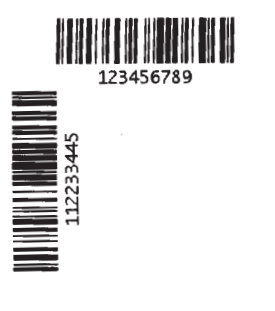
BARCODE 128 1 1 50 150 10 HORIZ.
TEXT 7 0 210 60 HORIZ.
VBARCODE 128 1 1 50 10 200 VERT.
VTEXT 7 0 60 140 VERT.
FORM
BARCODE-TEXT Command
The BARCODE-TEXT command is used to label bar codes with the same data used to create the bar code. The command eliminates the need to annotate the bar code using separate text commands. The text will be centered below the bar code.
Use BARCODE-TEXT OFF (or BT OFF) to disable.
Format:
{command} {font number} {font size} {offset}
where:
{command}: BARCODE-TEXT (or BT)
{font number}: The font number to use when annotating the bar code.
{font size}: The font size to use when annotating the bar code.
{offset}: Unit distance to offset text away from the bar code.
Ejemplo:
! 0 200 200 400 1
JOURNAL
CENTER
; Annotate bar codes using font 7 size 0
; and offset 5 dots from the bar code.
BARCODE-TEXT 7 0 5
BARCODE 128 1 1 50 0 20 123456789
VBARCODE 128 1 1 50 40 400 112233445
BARCODE-TEXT OFF
FORM